<?xml version="1.0" encoding="UTF-8"?>
<feed xmlns="http://www.w3.org/2005/Atom">
    <id>https://codingwithstef.com/feed</id>
    <link href="https://codingwithstef.com/feed"></link>
    <title><![CDATA[CodingWithStef]]></title>
    <description></description>
    <language></language>
    <updated>Wed, 09 Aug 2023 00:00:00 +0000</updated>
        <entry>
        <title><![CDATA[Reduce database queries with your own Facades]]></title>
        <link rel="alternate" href="https://codingwithstef.com/2023-08-09-reduce-database-queries-with-your-own-facades" />
        <id>https://codingwithstef.com/2023-08-09-reduce-database-queries-with-your-own-facades</id>
        <author>
            <name> <![CDATA[Stefan Ashwell]]></name>
        </author>
        <summary type="html">
            <![CDATA[<p>Quite often in our applications we need to run a query to retrieve some data that will be used across many different elements. Facades can be used to make this query once and have the data available for the whole application to use.</p>
<p>Let's take the example of an application that hosts multiple events. Each event has it's own page which contains multiple blade or Livewire components displaying different features.</p>
<p>You might also have a middleware that checks event settings, or other elements also requiring the event data.</p>
<p>Before you know it, you're running the same query 3, 4, 5 or more times across the application during a single page load. This is where a Facade can help.</p>
<p>We will need to create 3 files to get everything working for this, so bear with me and it'll all make sense in the end.</p>
<h2>The Facade</h2>
<p>In <code>app/Facades</code> create a new PHP class for your facade. I'm going to call mine <code>EventFacade</code>. The class would look like so:</p>
<pre><code class="language-php">&lt;?php
namespace App\Facades;

use Illuminate\Support\Facades\Facade;

class EventFacade extends Facade
{
    protected static function getFacadeAccessor()
    {
        return 'event';
    }
}
</code></pre>
<p>As you can see, this file isn't doing a great deal, but is the &quot;glue&quot; that makes everything work.</p>
<p>Essentially, in the <code>getFacadeAccessor</code> method I've defined the name of the service container binding that we want to use. In this case, I've called it <code>event</code>.</p>
<p>You can call this whatever makes sense for your application.</p>
<h2>The Service</h2>
<p>Next, we need to create a service. This will be the class that actually runs the query and returns the data.</p>
<p>In <code>app/Services</code> create a new PHP class for your service. I'm going to call mine <code>EventService</code>. The class would look like so:</p>
<pre><code class="language-php">&lt;?php
namespace App\Services;

use App\Models\Contest;
use Illuminate\Support\Facades\Auth;

class EventService
{
    public Event $event;

    public function __construct()
    {
        $this-&gt;event = Event::find(1); // Your logic for finding your event goes here
    }

    public function current()
    {
        return $this-&gt;event;
    }
}
</code></pre>
<p>The <code>__construct</code> is where we run our query - you can adjust to your needs here.</p>
<p>We then have a <code>current</code> method which we will use later to return the current event. You can add any methods you need to this class to access your data in any way you need in your application.</p>
<h2>The Service Provider</h2>
<p>Finally, we need to create a service provider. This will load our facade, link it to the service and make it available to the application.</p>
<p>In <code>app/Providers</code> create a new PHP class for your service provider. I'm going to call mine <code>EventServiceProvider</code>. The class would look like so:</p>
<pre><code class="language-php">&lt;?php
namespace App\Providers;

use Illuminate\Support\ServiceProvider;
use App\Services\EventService;

class EventServiceProvider extends ServiceProvider
{
    public function register()
    {
        $this-&gt;app-&gt;singleton('event', function () {
            return new EventService();
        });
    }
}
</code></pre>
<p>They key part of this is that we've used <code>singleton</code>. Notice I pass <code>event</code> as the first parameter, this must match the accessor that's returned by the Facade.</p>
<p>Using a singleton means that the service will only be instantiated once, and the same instance will be returned each time it is called. This way, we can be sure our query will only ever run once during a page load, no matter how many times we call it.</p>
<p>So, now everything's set up, wherever we need our event data in our application we can simply call:</p>
<pre><code class="language-php">$event = EventFacade::current();
</code></pre>
<p>The first time this is called it will run the query, and every time after that it will return the same instance of the data.</p>
<p>I hope you enjoyed this article. I'm currently working on a project that had this exact requirement, but it took me some digging to figure out how to solve the problem. As always, if you have any feedback, questions or just want to chat about code you can find me on Twitter <a href="https://twitter.com/CodingWithStef">@CodingWithStef</a>, and on my <a href="https://www.youtube.com/channel/UCM1RmGdOitFKJ_Ppmz8Qj4Q" rel="noopener" target="_blank" onclick="window.fathom.trackGoal('IBGEL2FY', 0);">YouTube channel</a>.</p>
<p>Until next time!</p>
]]>
        </summary>
        <category type="html">
            <![CDATA[]]>
        </category>
        <updated>Wed, 09 Aug 2023 00:00:00 +0000</updated>
    </entry>
        <entry>
        <title><![CDATA[How to embed essential CSS styles with a custom blade directive]]></title>
        <link rel="alternate" href="https://codingwithstef.com/2021-02-11-how-to-embed-essential-styles-with-a-custom-blade-directive" />
        <id>https://codingwithstef.com/2021-02-11-how-to-embed-essential-styles-with-a-custom-blade-directive</id>
        <author>
            <name> <![CDATA[Stefan Ashwell]]></name>
        </author>
        <summary type="html">
            <![CDATA[<p>When it comes to optimising your website for performance, embedding core, essential CSS in the head of your HTML can have a small impact. In doing so you can load initial styles immediately while your main CSS is loaded.</p>
<p>This is great, but it clutters up your HTML head. You <em>could</em> have a blade template dedicated to this, and include it in the head like so:</p>
<pre><code class="language-php">@include('includes.styles')
</code></pre>
<p>But, you now have a blade template file that just has CSS in it. It makes sense to have your CSS in <code>.css</code> files. Plus, if you're using a CSS pre-processor like SASS you can't have that in a blade template.</p>
<p>So wouldn't it be nicer if we had a separate CSS file which we could reference, and blade embeds the contents of that file into the head for us?</p>
<p>Sounds like a job for Blade!</p>
<p><img src="/img/blade.gif" alt="Sounds like a job for Blade" title="Sounds like a job for Blade" /></p>
<p>To add a custom directive we need to add some code to the <code>boot</code> method in our <code>App\Providers\AppServiceProvider</code>.</p>
<p>Essentially what we want to do is pass in the path to our CSS file, and use PHP's <code>get_file_contents()</code> function to echo the contents of the file.</p>
<pre><code class="language-php">&lt;?php

namespace App\Providers;

use Illuminate\Support\Facades\Blade;
use Illuminate\Support\ServiceProvider;

class AppServiceProvider extends ServiceProvider
{
    ...

    /**
     * Bootstrap any application services.
     *
     * @return void
     */
    public function boot()
    {
        Blade::directive('embedstyles', function ($expression) {
            return &quot;&lt;style&gt;&lt;?php echo file_get_contents($expression); ?&gt;&lt;/style&gt;&quot;;
        });
    }
}
</code></pre>
<p>As you can see above, we've declared a new directive using the <code>directive</code> method on the <code>Blade</code> facade. We've named it <code>embedstyles</code> and in the callback we return the PHP code to display the contents of the file.</p>
<p>Pretty simple stuff really!</p>
<p>Now, in our HTML head we can use the directive to include our essential CSS.</p>
<pre><code class="language-php">@embedstyles('css/core.css')
</code></pre>
<p>I hope you enjoyed this article. I'm currently working on a project that had this exact requirement, so I thought it would be a good example of a custom blade directive. As always, if you have any feedback, questions or just want to chat about code you can find me on Twitter <a href="https://twitter.com/CodingWithStef">@CodingWithStef</a>, and on my <a href="https://www.youtube.com/channel/UCM1RmGdOitFKJ_Ppmz8Qj4Q" rel="noopener" target="_blank" onclick="window.fathom.trackGoal('IBGEL2FY', 0);">YouTube channel</a>.</p>
<p>Until next time!</p>
]]>
        </summary>
        <category type="html">
            <![CDATA[]]>
        </category>
        <updated>Thu, 11 Feb 2021 00:00:00 +0000</updated>
    </entry>
        <entry>
        <title><![CDATA[YouTube Journey part 1 - my first month running a YouTube channel]]></title>
        <link rel="alternate" href="https://codingwithstef.com/2021-01-25-youtube-journey-part-1-my-first-month-running-a-youtube-channel" />
        <id>https://codingwithstef.com/2021-01-25-youtube-journey-part-1-my-first-month-running-a-youtube-channel</id>
        <author>
            <name> <![CDATA[Stefan Ashwell]]></name>
        </author>
        <summary type="html">
            <![CDATA[<p><em><strong>There are lots of resources out there with advice on starting a YouTube channel, however I thought it might be an interesting take to start a series on here following the progress and sharing what I learn during the process.</strong></em></p>
<p>Just over a month ago I took the leap and <a href="https://www.youtube.com/channel/UCM1RmGdOitFKJ_Ppmz8Qj4Q" rel="noopener" target="_blank" onclick="window.fathom.trackGoal('IBGEL2FY', 0);">started my own YouTube channel</a>.</p>
<p>It's something I've been considering for quite a while, but kept making excuses not to like...</p>
<p><em>&quot;I'm not comfortable speaking on the mic&quot;</em></p>
<p><em>&quot;What if the videos are just crap and nobody watches?&quot;</em></p>
<p>In the end I gave myself the push I needed and just jumped in. I decided that it won't be perfect, I won't get many views or subscribers and I won't feel comfortable speaking on the mic.</p>
<p>BUT, crucially, I realised that by starting I can improve. I can work on making better videos and over time I hope it will become a channel that is successful.</p>
<p>The best way to learn is by doing, so let's just start doing!</p>
<h2>What should I make a channel about?</h2>
<p>And so I created the channel, put together some quick visuals for an avatar and header image, and got to work.</p>
<p>To begin with I brainstormed some ideas for content. During my career I've used a lot of different technologies and I could create content on a wide range of topics, but it would make more sense to focus on something specific so the channel has a clear focus (at least initially).</p>
<p>I use Laravel day-to-day these days during my day job, so I settled on creating Laravel content. Whipped out my phone and started listing ideas for Laravel videos I could create.</p>
<p>Before long I had a huge list of ideas, and that was just the initial brain dump - by no means an exhaustive list.</p>
<p>I figured that was a good sign. I shouldn't have any problems coming up with ideas for content!</p>
<h2>The first videos</h2>
<p>From the list I created above, I chose something I felt I could explain well and I'd be able to put together enough examples for. That topic was Validation.</p>
<p>I could show some examples of validating a form and then refactoring a form request.</p>
<p>I also had the idea that it didn't just have to be forms you can validate. A few months back I had a requirement for a project I was working on to import some data from a csv file which I knew included some bad data. I'd used the validator when importing these to remove the bad data.</p>
<p>So, I prepped the examples, wrote a &quot;script&quot; of bullet points, and then did the screen recording.</p>
<p>It took way longer than I expected.</p>
<p>While I knew I wouldn't be comfortable speaking on the mic, I didn't anticipate how many mistakes I'd make. Slurring my words and tripping up. Needless to say it took quite a while, and I ended up with around 2 hours of footage.</p>
<p>By the time I edited it down I had around 23 minutes of usable recording, which I ultimately decided to split up into 2 videos.</p>
<p>The first video went live on 19th December 2020, and the second one I managed to get live in between Christmas and New Year on 30th December.</p>
<h2>Creating a schedule</h2>
<p>Some advice I've seen multiple times about creating a YouTube channel is to be consistent and have a schedule to stick to. My aim is to post one video a week, and since the first two I've posted three more videos sticking to this schedule.</p>
<p>That said, I do want to be more consistent with this moving forward.</p>
<h2>Channel stats month 1</h2>
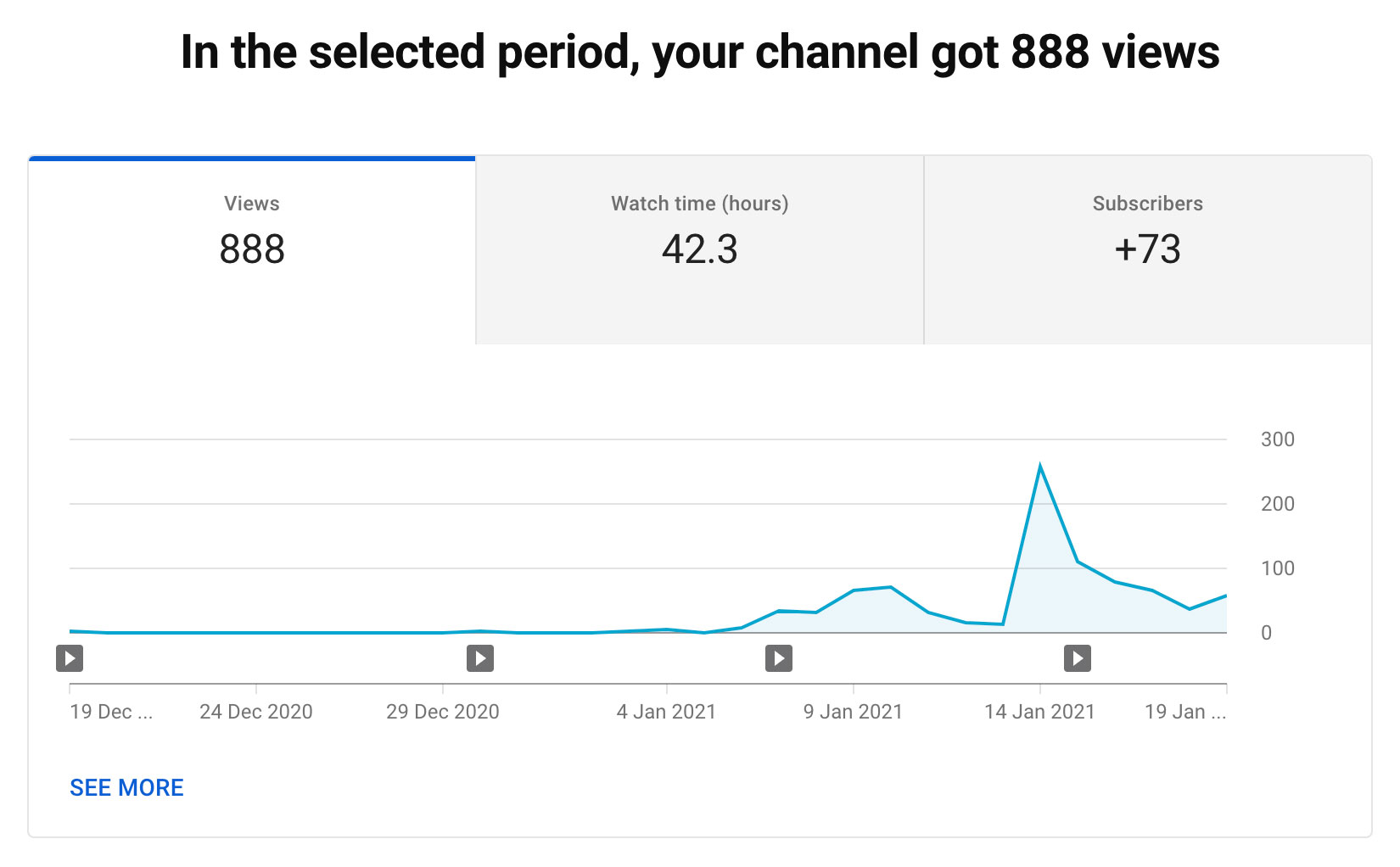
<p>So let's get into the meat and two veg and look at the numbers. During my first month I posted 4 videos, here's the stats from month 1:</p>
<p><img src="/img/yt-stats-month-1.jpg" alt="YouTube Channel Stats 19 Dec 20 - 19 Jan 21" title="YouTube Channel Stats 19 Dec 20 - 19 Jan 21" /></p>
<p>As you can see, I managed to get <strong>888</strong> views in my first month. I have to say this is WAY more than I was expecting!</p>
<p>That said, nothing really happened until 7th Jan when I posted my 3rd video. At this point I decided to start sharing the fact my channel existed online. I did this by posting on social media, and submitting to the <a href="https://laravel-news.com/links">Laravel News community links section</a>.</p>
<p>This is where things started moving. The big spike on 14th Jan I posted my 3rd video on the Laravel subreddit which received a few upvotes.</p>
<p>I also gained <strong>73</strong> subscribers during this time which again is so many more than I expected. If you are one of these people thank you!</p>
<p>This means I've been getting 1 subscriber roughly every 12 views on my videos. I'm brand new to this but I wasn't expecting that kind of conversion rate of view to subscriber.</p>
<p>Maybe it's because nearly every viwer isn't a subscriber, so as my subscriber base grows this may shift to a lower rate because a lot of views will be from existing subscribers. It will be interesting to see.</p>
<h2>What I've learned</h2>
<p>I've learned a huge amount over the last month. First of all you can't rely on being picked up by YouTube's search early on. From my research, one of the most important things for YouTube SEO is average watch time, and I can see that my video with the highest average watch time it is performing better in search than the others. Therefore you need some viewers to make that happen.</p>
<p>I received feedback about one of my videos that the intro was too long and it took around 1 minute to get into the content. It's funny how even when you've done the research and know what not to do, you can somehow become blind to the fact you've done it. Moving forward I'm keeping my intro to a minimum and getting into the content as quick as I can - after all it's why people are watching.</p>
<p>I also learned a bit about editing audio in Adobe Audition. I still don't think it's perfect but there's a noticeable difference between my first video and my latest video, and it's just down to the editing - all the kit is the same.</p>
<h2>Improvements</h2>
<p>One of the keys to this process if I'm to continue to grow the channel is constantly looking to improve.</p>
<p>From a video production standpoint, I am looking at the brand itself and getting an animated intro made - something that doesn't take up much time so I can get to the content quickly as I mentioned above.</p>
<p>I also need to be better at sticking to a consistent day and time for my videos to launch. I feel this consistency will help with the channel's growth, and my subscribers will start to get used to when to expect a new video to drop.</p>
<p>Thanks for reading, hopefully you found this article useful. This article is the start of a <a href="/articles/my-youtube-journey">My YouTube Journey</a> series, which will continue next month. See you then!</p>
]]>
        </summary>
        <category type="html">
            <![CDATA[]]>
        </category>
        <updated>Mon, 25 Jan 2021 00:00:00 +0000</updated>
    </entry>
        <entry>
        <title><![CDATA[How to stop Laravel setting default cookies]]></title>
        <link rel="alternate" href="https://codingwithstef.com/2021-01-21-how-to-stop-laravel-setting-default-cookies" />
        <id>https://codingwithstef.com/2021-01-21-how-to-stop-laravel-setting-default-cookies</id>
        <author>
            <name> <![CDATA[Stefan Ashwell]]></name>
        </author>
        <summary type="html">
            <![CDATA[<p><em><strong>This post includes affiliate links; I may receive compensation if you purchase products or services from links provided in this article.</strong></em></p>
<p>We've all seen them a million times and they annoy us way more than they solve a problem.</p>
<p>Cookie consent banners have become so common these days that half the time I just click the button to get rid of them without a second thought.</p>
<p>When I started this website I set out with a clear set of goals in mind - simple, quick and informative. One thing that doesn't fit in with those ideals is a horrible cookie banner. So I looked for a solution.</p>
<h2>When do you need a cookie banner?</h2>
<p>As far as I understand it (and I'm no legal expert!) you need a cookie consent banner when you store information in cookies or via other methods (such as local storage) and they are not required in order for the site to function.</p>
<p>You don't need to have one when you only use cookies in order for the site to function correctly - such as to remember a user is logged in.</p>
<h2>So what did I decide?</h2>
<p>This site is intentionally simple.</p>
<p>Even though it's built in Laravel, it's <a href="/2021-01-17-creating-a-markdown-driven-blog-using-laravel-8">essentially a static site</a>.</p>
<p>There's no logins or other bells and whistles.</p>
<p>Therefore I decided there was no reason to store cookies at all - removing the requirement to have a cookie consent banner. Simple.</p>
<h2>Stop Laravel setting cookies</h2>
<p>Even if you're not using any features that require cookies, by default Laravel sets two - a <strong>laravel_session</strong> cookie, and an <strong>xsrf_token</strong> cookie.</p>
<p>I don't need the session cookie because I'm not using sessions for anything on the site.</p>
<p>There are also no forms on the website, so the xsrf token is not required either.</p>
<p>To stop Laravel creating these cookies, first I commented the following lines in <strong>app/Http/Kernel.php</strong></p>
<pre><code class="language-php">'web' =&gt; [
    \App\Http\Middleware\EncryptCookies::class,
    \Illuminate\Cookie\Middleware\AddQueuedCookiesToResponse::class,
    //\Illuminate\Session\Middleware\StartSession::class,
    //\Illuminate\Session\Middleware\AuthenticateSession::class,
    //\Illuminate\View\Middleware\ShareErrorsFromSession::class,
    //\App\Http\Middleware\VerifyCsrfToken::class,
    \Illuminate\Routing\Middleware\SubstituteBindings::class,
],
</code></pre>
<p>Then, I set the session driver to array in my <strong>.env</strong> file:</p>
<pre><code class="language-yaml">SESSION_DRIVER=array
</code></pre>
<p>As simple as that.</p>
<h2>What about stats?</h2>
<p>The usual culprit for storing cookies that aren't required for a site to function are those set by a stats service such as Google Analytics.</p>
<p>Obviously I want to see how my site's performing, how visitors find the site, see which posts are popular and what type of content goes down well with visitors.</p>
<p>That shouldn't mean my site has to set intrusive cookies.</p>
<p>And so I looked around for an alternative and found <a href="https://usefathom.com/ref/VWS2XR" onclick="window.fathom.trackGoal('UXWZGNGP', 0);">Fathom</a>.</p>
<p>Fathom take privacy very seriously, and their stats service doesn't store any cookies at all. It tracks visitors anonymously so I can see a simple set of stats about my site - visitors, referrals, bounce rate, time on site, country etc.</p>
<p>This means everyone can be happy - no cookie banner, no intrusive cookies. It even respects visitors who have opted out of tracking services.</p>
<p>Thanks for reading, hopefully you found this article useful. If you want to chat about anything in this article or about anything to do with code you can find me on Twitter <a href="https://twitter.com/CodingWithStef">@CodingWithStef</a>, and on my <a href="https://www.youtube.com/channel/UCM1RmGdOitFKJ_Ppmz8Qj4Q" rel="noopener" target="_blank" onclick="window.fathom.trackGoal('IBGEL2FY', 0);">YouTube channel</a>.</p>
]]>
        </summary>
        <category type="html">
            <![CDATA[]]>
        </category>
        <updated>Thu, 21 Jan 2021 00:00:00 +0000</updated>
    </entry>
        <entry>
        <title><![CDATA[Creating a Markdown Driven Blog using Laravel 8]]></title>
        <link rel="alternate" href="https://codingwithstef.com/2021-01-17-creating-a-markdown-driven-blog-using-laravel-8" />
        <id>https://codingwithstef.com/2021-01-17-creating-a-markdown-driven-blog-using-laravel-8</id>
        <author>
            <name> <![CDATA[Stefan Ashwell]]></name>
        </author>
        <summary type="html">
            <![CDATA[<p>In this post I’m going to walk you through how I created this website using Markdown files with Laravel 8, and why I chose to go that route instead of a blogging platform like <a href="https://wordpress.org">Wordpress</a> or <a href="https://ghost.org">Ghost</a>.</p>
<p>The result was a really quick site build and something very simple for me to maintain.</p>
<h2>Why Markdown with Laravel?</h2>
<p>So the first question is why I went this route?</p>
<p>Well, I wanted to get something live as quickly as possible. I’ve tried blogging in the past and got too hung up in the site’s design or features.</p>
<p>This time I wanted to focus on the content.</p>
<p>The sensible choice would be Wordpress or Ghost right? Actually, not for me. It’s a long time since I’ve built anything in Wordpress, and while I’ve played around with Ghost and it looks very cool there would still be a learning process.</p>
<p>Everything I build these days is in Laravel, so the quickest way to get this up and live would be to go that way.</p>
<p>Plus I don’t need a full CMS interface to manage the content. I’m more than happy to write posts in Markdown in my text editor.</p>
<p>And so I got to work building something that would read Markdown files from a directory and display them on screen. Nice and simple.</p>
<h2>Reading Markdown Files</h2>
<p>So the main challenge with this build was to figure out how to read Markdown files in a directory.</p>
<p>I knew I’d need to do this in 2 different situations.</p>
<p>First, getting a list of posts in date order for listing screens. Secondly, reading a single file to display a single post.</p>
<p>I decided to include the publish date in the file names, and also to use the file names as the post slugs. For example:</p>
<pre><code class="language-bash">2021-01-16-creating-a-markdown-blog-with-laravel-8.md
</code></pre>
<p>Then, I created a <strong>Post</strong> class, and in the constructor created a collection of all of the filenames in the <strong>app/Posts</strong> directory. Here’s the code:</p>
<pre><code class="language-php">use Illuminate\Support\Facades\File;

class Post
{
    public $filenames;

    public function __construct()
    {
        $this-&gt;filenames = collect(File::allFiles(app_path('Posts')))
            -&gt;sortByDesc(function ($file) {
                return $file-&gt;getBaseName();
            })
            -&gt;map(function ($file) {
                return $file-&gt;getBaseName();
            });
    }
}
</code></pre>
<p>Here I’m using the <strong>Illuminate\Support\Facades\File</strong> class to list files in the <strong>app/Posts</strong> directory. Then using <strong>sortByDesc</strong> I ensure they are in date order.</p>
<p>Finally, I use the map method to store just the file name in the collection array.</p>
<h2>Creating the Listings Pages</h2>
<p>There are 2 types of listings pages - the homepage lists all posts, and the category pages list posts in a particular category. I started by looking at the first situation.</p>
<p>To achieve this, I would need to use the <strong>Illuminate\Filesystem\Filesystem</strong> class, so I create an instance of this in the constructor:</p>
<pre><code class="language-php">use Illuminate\Support\Facades\File;
use Illuminate\Filesystem\Filesystem;

class Post
{
    public $filenames;
    public $filesystem;

    public function __construct()
    {
        $this-&gt;filenames = collect(File::allFiles(app_path('Posts')))
            -&gt;sortByDesc(function ($file) {
                return $file-&gt;getBaseName();
            })
            -&gt;map(function ($file) {
                return $file-&gt;getBaseName();
            });
        
        $this-&gt;filesystem = new Filesystem();
    }
}
</code></pre>
<p>Next, I created a <strong>getLatest</strong> method on the Post class:</p>
<pre><code class="language-php">public function getLatest($limit)
{
    $posts = [];

    foreach ($this-&gt;filenames-&gt;take($limit) as $filename) {
        // Build $posts array
    }

    return collect($posts);
}
</code></pre>
<p>This method gets a number of posts specified by the limit parameter. Because the filenames are a collection I can use the take method for this.</p>
<p>Next, I created a <strong>getPostData</strong> method to read each post:</p>
<pre><code class="language-php">use League\CommonMark\Environment;
use League\CommonMark\CommonMarkConverter;
use League\CommonMark\Extension\Attributes\AttributesExtension;

...

public function getPostData($filename)
{
    $file = $this-&gt;filesystem-&gt;get(app_path('Posts/' . $filename));

    $post['slug'] = str_replace('.md', '', $filename);

    $environment = Environment::createCommonMarkEnvironment();
    $environment-&gt;addExtension(new AttributesExtension());
    $converter = new CommonMarkConverter([], $environment);

    $post['body'] = $converter-&gt;convertToHtml($file);

    return $post;
}
</code></pre>
<p>As you can see here I am making use of the <strong>league/commonmark</strong> package to read the Markdown file and convert it to HTML.</p>
<pre><code class="language-bash">composer require league/commonmark
</code></pre>
<blockquote class="callout">
<p><strong>What's the AttributesExtension?</strong></p>
<p>The attributes extension allows me to add attributes to elements in the Markdown itself. I use it to create callouts just like this one by assigning the <strong>.callout</strong> class to a blockquote. <a href="https://commonmark.thephpleague.com/1.5/extensions/attributes/">You can read more here</a>.</p>
</blockquote>
<p>I also generate the slug by removing the <strong>.md</strong> extension.</p>
<p>An array of post data is returned, and so back in the getLatest method I call getPostData on each post.</p>
<pre><code class="language-php">public function getLatest($limit)
{
    $posts = [];

    foreach ($this-&gt;filenames-&gt;take($limit) as $filename) {
        $posts[] = $this-&gt;getPostData($filename);
    }

    return collect($posts);
}
</code></pre>
<p>Now, in my <strong>HomepageController</strong> I call the <strong>getLatest</strong> method to get the 5 latest posts, and pass the returned data to the view:</p>
<pre><code class="language-php">namespace App\Http\Controllers;

use App\Models\Post;

class HomepageController extends Controller
{
    public function index()
    {
        $postClass = new Post;

        $posts = $postClass-&gt;getLatest(5);

        return view('homepage', compact('posts'));
    }
}
</code></pre>
<h2>Using Frontmatter</h2>
<p>This was a good start, however I didn’t want to display the full HTML in the listings. I also wanted to categorise posts.</p>
<p>Enter frontmatter - a section of information at the top of the Markdown file where I could set any of this information. It looks like this:</p>
<pre><code class="language-md">
---

title: Creating a Markdown Driven Blog using Laravel 8
published: 2021-01-16
category: Laravel
excerpt: In this post I’m going to walk you through how I created this website using Markdown files with Laravel 8, and why I chose to go that route instead of a blogging platform like Wordpress or Ghost.

---

</code></pre>
<p>Now you can see I have the post title, date, category and an excerpt set.</p>
<p>This information can be retrieved using the <strong>spatie/yaml-front-matter</strong> package.</p>
<pre><code class="language-bash">composer require spatie/yaml-front-matter
</code></pre>
<p>So let’s use this when building the post information:</p>
<pre><code class="language-php">use Spatie\YamlFrontMatter\YamlFrontMatter;

...

public function getPostData($filename)
{
    $file = $this-&gt;filesystem-&gt;get(app_path('Posts/' . $filename));
    $object = YamlFrontMatter::parse($file);

    $post['meta'] = $object-&gt;matter();
    $post['slug'] = str_replace('.md', '', $filename);

    $environment = Environment::createCommonMarkEnvironment();
    $environment-&gt;addExtension(new AttributesExtension());
    $converter = new CommonMarkConverter([], $environment);

    $post['body'] = $converter-&gt;convertToHtml($object-&gt;body());

    return $post;
}
</code></pre>
<p>As you can see, the file’s contents are now parsed by <strong>YamlFrontMatter</strong> first.</p>
<p>I’ve added meta to the returned array that contains all of these fields.</p>
<p>And the body HTML is generated by passing the body of the parsed post rather than the entire file.</p>
<p>This means I can now update my homepage view to just display the title, date, category and excerpt.</p>
<h2>Adding Categories</h2>
<p>Next, let’s look at categories. We have the category in our frontmatter, I would like to have dedicated category pages using the URL <strong>articles/{category}</strong> so the first step is to create that route:</p>
<pre><code class="language-php">use App\Http\Controllers\CategoryController;

...

Route::get('articles/{category}', [CategoryController::class, 'index']);
</code></pre>
<p>So in order to do this filtering I need to read each file. So I created a <strong>getCategory</strong> method in the Post class:</p>
<pre><code class="language-php">public function getCategory($category, $limit)
{
    $posts = [];

    foreach ($this-&gt;filenames as $filename) {
        $posts[] = $this-&gt;getPostData($filename);
    }

    return collect($posts)-&gt;where('category', ucwords($category))-&gt;take($limit);
}
</code></pre>
<p>This method loops through all of the posts getting all data. Then on the collection returned I use the where method to filter the posts that are returned.</p>
<p>In order for this to work, I expanded the <strong>getPostData</strong> method to set a category key in the post array, so that it's there for the where method to filter by:</p>
<pre><code class="language-php">public function getPostData($filename)
{
    $file = $this-&gt;filesystem-&gt;get(app_path('Posts/' . $filename));
    $object = YamlFrontMatter::parse($file);

    $post['meta'] = $object-&gt;matter();
    $post['category'] = $object-&gt;matter('category');
    $post['slug'] = str_replace('.md', '', $filename);

    $environment = Environment::createCommonMarkEnvironment();
    $environment-&gt;addExtension(new AttributesExtension());
    $converter = new CommonMarkConverter([], $environment);

    $post['body'] = $converter-&gt;convertToHtml($object-&gt;body());

    return $post;
}
</code></pre>
<p>Now, in the <strong>CategoryController</strong> I can call the <strong>getCategory</strong> method to get the latest posts in the category requested:</p>
<pre><code class="language-php">namespace App\Http\Controllers;

use App\Models\Post;

class CategoryController extends Controller
{
    public function index($category)
    {
        $postClass = new Post;

        $posts = $postClass-&gt;getCategory($category, 5);

        if ($posts-&gt;count() == 0) {
            return redirect('/');
        }

        return view('category', compact('posts'));
    }
}
</code></pre>
<blockquote class="callout">
<p><strong>Note:</strong> Right now I think this approach is fine as I only have a small number of posts on the site. As the site grows with more posts I would like to look into a more efficient way to achieve this filtering so I don’t need to process every single post first!</p>
</blockquote>
<h2>Post Detail</h2>
<p>Finally, I needed a post detail page. Here’s the route:</p>
<pre><code class="language-php">use App\Http\Controllers\ArticleController;

...

Route::get('{slug}', [ArticleController::class, 'index']);
</code></pre>
<p>And then the <strong>ArticleController</strong> calls <strong>getPostData</strong> on the filename requested by the slug in the URL:</p>
<pre><code class="language-php">namespace App\Http\Controllers;

use App\Models\Post;

class ArticleController extends Controller
{
    public function index($slug)
    {
        $postClass = new Post;

        $post = $postClass-&gt;getPostData($slug . '.md');
        
        return view('article', compact('post'));
    }
}
</code></pre>
<p>Nice and simple!</p>
<h2>Future Improvements</h2>
<p>This setup allowed me to get live and start posting content super quickly - a couple of evenings work and I was ready to go live!</p>
<p>As mentioned in a note above, I’m not 100% happy with the category filtering and I’d like to look into that as it could impact performance as the number of posts increase.</p>
<p>That said, another improvement I am considering is to use the <a href="https://github.com/spatie/laravel-export">spatie/laravel-export</a> package to generate a static site as part of my <a href="https://codingwithstef.com/2021-01-07-how-i-deploy-my-laravel-website-with-envoy">deployment process</a>.</p>
<p>This way I should be able to improve performance even further on the site by hosting just static files. But it would reduce the impact of any potential category filtering issues as it would only happen at build time.</p>
<p>I would also like to add an RSS feed, and a suggested article feature that appears at the bottom of the post detail page.</p>
<p>Thanks for reading, hopefully you found this article useful. If you use a similar setup or if you give this a go yourself let me know on Twitter <a href="https://twitter.com/CodingWithStef">@CodingWithStef</a>!</p>
]]>
        </summary>
        <category type="html">
            <![CDATA[]]>
        </category>
        <updated>Sun, 17 Jan 2021 00:00:00 +0000</updated>
    </entry>
        <entry>
        <title><![CDATA[How I Deploy My Laravel Website With Envoy]]></title>
        <link rel="alternate" href="https://codingwithstef.com/2021-01-07-how-i-deploy-my-laravel-website-with-envoy" />
        <id>https://codingwithstef.com/2021-01-07-how-i-deploy-my-laravel-website-with-envoy</id>
        <author>
            <name> <![CDATA[Stefan Ashwell]]></name>
        </author>
        <summary type="html">
            <![CDATA[<p>So you‘ve built the perfect website, poured hours of time and effort making it perfect.</p>
<p>You’ve tested it in as many browsers and on as many devices you possibly can.</p>
<p>It’s finally ready - it’s time to deploy your website and show the world.</p>
<p>Luckily, Laravel is there for you - as it always is - with Envoy.</p>
<p>In this article I show you how I deploy this very website using Laravel Envoy, so you can do the same with yours.</p>
<h2>What is Laravel Envoy?</h2>
<p>Envoy is your new friend that will log in to your server for you and run any tasks you want it to.</p>
<p>By creating a single blade file, you can get Envoy to deploy your site at the run of a single command.</p>
<p>Let’s walk through how…</p>
<h2>Setting Up</h2>
<p>Before we begin, you need to have a web server set up and ready to go. Setting up a server ready to host your production site is out of the scope of this article, I’d recommend this article by <a href="https://www.digitalocean.com/community/tutorials/how-to-install-linux-apache-mysql-php-lamp-stack-on-ubuntu-20-04">Digital Ocean to get started</a>.</p>
<p>You will need to be able to log in to your server via ssh. If you can log in from your machine via the command line, Envoy will be able to do its thing.</p>
<p>Once you’re set up, install Envoy with the following command:</p>
<pre><code class="language-bash">composer require laravel/envoy --dev
</code></pre>
<h2>Creating Your Envoy File</h2>
<p>The Envoy file is where you tell Envoy what you want it to do.</p>
<p>In the root of your application, create a file named Envoy.blade.php.</p>
<p>The Envoy file will contain 2 parts. First, we set the server information.</p>
<pre><code class="language-php">@servers(['prod' =&gt; ['user@ip_address']])
</code></pre>
<p>This would be populated with your ssh user and ip address. Next, we can define any number of tasks. In our case well just create one called deploy.</p>
<pre><code class="language-php">@task('deploy', ['on' =&gt; 'prod'])
    
@endtask
</code></pre>
<p>Within our task, we list the commands we want Envoy to perform. Imagine you’ve logged in to the server yourself to deploy or update your site.</p>
<pre><code class="language-php">@task('deploy', ['on' =&gt; 'prod'])
    cd /path/to/codingwithstef.com
    git pull origin master
    composer install --optimize-autoloader --no-dev
    php artisan cache:clear
    php artisan view:cache
    php artisan optimize
@endtask
</code></pre>
<blockquote class="callout">
<p><strong>No Migrations?</strong></p>
<p>This site isn't database driven, so there's no need for them to run in my case.</p>
</blockquote>
<p>Here we are telling Envoy to:</p>
<ul>
<li>Navigate to the website root directory</li>
<li>Git pull to get the latest code</li>
<li>Composer install in case any dependencies need to be updated</li>
<li>Clear our caches</li>
</ul>
<blockquote class="callout">
<p><strong>composer install --optimize-autoloader --no-dev?</strong></p>
<p>Adding the <strong>--optimize-autoloader</strong> and <strong>--no-dev</strong> flags optimises the autoloader for production and so is recommended for deployment.</p>
</blockquote>
<p>Here's the full file:</p>
<pre><code class="language-php">@servers(['prod' =&gt; ['user@ip_address']])

@task('deploy', ['on' =&gt; 'prod'])
    cd /path/to/codingwithstef.com
    git pull origin master
    composer install --optimize-autoloader --no-dev
    php artisan cache:clear
    php artisan view:cache
    php artisan optimize
@endtask
</code></pre>
<p>That’s it, now we can run Envoy.</p>
<h2>Running Laravel Envoy</h2>
<p>You can use the following command to run Envoy.</p>
<pre><code class="language-bash">php vendor/bin/envoy run deploy
</code></pre>
<p>You will see the commands being run in your command line so you can check everything’s been done correctly and also see any errors.</p>
<p>That’s it - how easy is that?</p>
<h2>Taking it Further</h2>
<p>For more complex set ups, you can run tasks on multiple servers, and even run them in parallel like so.</p>
<pre><code class="language-php">@servers(['server-1' =&gt; 'user@ip_address', 'server-2' =&gt; 'user@ip_address'])

@task('deploy', ['on' =&gt; ['server-1', 'server-2'], 'parallel' =&gt; true])
    cd /path/to/codingwithstef.com
    git pull origin master
    composer install --optimize-autoloader --no-dev
    php artisan cache:clear
    php artisan view:cache
    php artisan optimize
@endtask
</code></pre>
<p>You can even pass in arguments, for example you could tell it which branch to deploy.</p>
<pre><code class="language-php">@servers(['server-1' =&gt; 'user@ip_address', 'server-2' =&gt; 'user@ip_address'])

@task('deploy', ['on' =&gt; ['server-1', 'server-2'], 'parallel' =&gt; true])
    cd /path/to/codingwithstef.com
    git pull origin {{ $branch }}
    composer install --optimize-autoloader --no-dev
    php artisan cache:clear
    php artisan view:cache
    php artisan optimize
@endtask
</code></pre>
<pre><code class="language-bash">php vendor/bin/envoy run deploy --branch=master
</code></pre>
<p>To read further, check out the <a href="https://laravel.com/docs/8.x/envoy">Envoy documentation here</a>.</p>
<p>Thanks for reading, hopefully you found this article useful. Having this in place on this site makes life so easy updating things!</p>
<p>As always, if you have any feedback or just want to chat about code, you can find me on Twitter <a href="https://twitter.com/CodingWithStef">@CodingWithStef</a>, and on my <a href="https://www.youtube.com/channel/UCM1RmGdOitFKJ_Ppmz8Qj4Q" rel="noopener" target="_blank" onclick="window.fathom.trackGoal('IBGEL2FY', 0);">YouTube channel</a>.</p>
]]>
        </summary>
        <category type="html">
            <![CDATA[]]>
        </category>
        <updated>Thu, 07 Jan 2021 00:00:00 +0000</updated>
    </entry>
        <entry>
        <title><![CDATA[Using Observers in Laravel to perform actions on model state change and clean up your code]]></title>
        <link rel="alternate" href="https://codingwithstef.com/2021-01-05-using-observers-in-laravel" />
        <id>https://codingwithstef.com/2021-01-05-using-observers-in-laravel</id>
        <author>
            <name> <![CDATA[Stefan Ashwell]]></name>
        </author>
        <summary type="html">
            <![CDATA[<p>Quite often you will need to perform actions when a model is created or changed.</p>
<p>Say you have a <strong>Posts</strong> model, you might want to send notifications of the new post to subscribers, or you might want to notify an admin every time a post is edited.</p>
<p>Whatever the situation, it’s automatic for us to put these actions in the controller that handles this creation or edit - after all, the controller is responsible for that action right?</p>
<p>That’s where observers can step in, to clean up your controller code and ensure these actions are performed however a model is updated.</p>
<h2>What is an Observer?</h2>
<p>Observers are classes that contain methods that are triggered when a models state changes. Under the hood, Laravel triggers events that observers can listen to.</p>
<p>Observers can perform actions on <strong>create</strong>, <strong>update</strong>, <strong>delete</strong>, <strong>restored</strong> and <strong>forceDelete</strong>.</p>
<blockquote class="callout">
<p><strong>When do Restored and forceDelete trigger?</strong></p>
<p>These events are triggered on models that are using <strong>Soft Deletes</strong>, when either restoring or force deleting. <a href="https://laravel.com/docs/8.x/eloquent#soft-deleting">Read more about soft deleting</a>.</p>
</blockquote>
<p>The idea is that whenever one of these actions is performed on a model - regardless of where or how - your actions are performed.</p>
<p>Think about this example:</p>
<blockquote>
<p>You have a Users model, and in your application users can update their own information. Admins can also update a user's information. These two updates will typically be performed by different controllers.</p>
<p>Add to this equation an artisan command that updates users in bulk somehow, or there may be a scheduled task that updates users information.</p>
<p>In all of these situations, there could be additional actions to perform other than the update itself - such as notifying the user of the change, or logging the change for admin purposes.</p>
<p>It doesn’t make sense to have this duplication of code - if you wanted to change how these actions or fix a bug you’d have to do it 4 times.</p>
</blockquote>
<p>That’s the perfect use case for an observer. It will listen for the change and perform actions every time.</p>
<h2>Creating an Observer</h2>
<p>Now you’re saying “less waffle Stef, how do I do this?”</p>
<p>Well, here we go. There’s an artisan command to generate an Observer:</p>
<pre><code class="language-bash">php artisan make:observer UserObserver --model=User
</code></pre>
<p>This will create the class in an Observers directory, and if you open up that new class you’ll see the following boilerplate:</p>
<pre><code class="language-php">&lt;?php

namespace App\Observers;

use App\Models\User;

class UserObserver
{
    public function created(User $user)
    {
        //
    }

    public function updated(User $user)
    {
        //
    }

    public function deleted(User $user)
    {
        //
    }

    public function restored(User $user)
    {
        //
    }

    public function forceDeleted(User $user)
    {
        //
    }
}
</code></pre>
<p>As you can see, there’s a method for <strong>create</strong>, <strong>update</strong>, <strong>delete</strong>, <strong>restored</strong> and <strong>forceDelete</strong>.</p>
<p>These methods accept the model as a parameter.</p>
<p>And quite simply, you can go ahead and perform whatever action you need to in these methods!</p>
<p>Here’s an example where we send a notification on update:</p>
<pre><code class="language-php">use App\Notifications\UserUpdated;

...

public function updated(User $user)
{
    $user-&gt;notify(new UserUpdated($user));
}
</code></pre>
<p>Simple right?</p>
<h2>Registering Observers</h2>
<p>There’s one final thing to do to get Laravel to use our Observer - we need to register it.</p>
<p>To do this we add the following to the <code>boot</code> method of our <code>App\Providers\EventServiceProvider</code> service provider:</p>
<pre><code class="language-php">use App\Models\User;
use App\Observers\UserObserver;

...

public function boot()
{
    User::observe(UserObserver::class);
}
</code></pre>
<p>Now, Laravel with use our Observer methods.</p>
<h2>Skipping Observers</h2>
<p>Observers are great, but there might be situations where you want to not have them run.</p>
<p>It could be that the scheduled task we mentioned before is just doing some clean up so the user doesn’t need to be notified every time.</p>
<p>In that case, you can use the saveQuietly method instead, for example:</p>
<pre><code class="language-php">$user-&gt;saveQuietly();
</code></pre>
<h2>Further Reading</h2>
<p>Of course, Laravel's documentation includes a section detailing how Observers can be used. <a href="https://laravel.com/docs/8.x/eloquent#observers">Be sure to head over there to read more about them</a>.</p>
<h2>Observers: Done</h2>
<p>And there you have it, Observers give you a nice clean way to react to model changes and perform actions in one place rather than duplicating code.</p>
<p>If you have any questions about Observers or Laravel in general, or any feedback about this article, you can find me on Twitter <a href="https://twitter.com/CodingWithStef">@CodingWithStef</a> I’m always happy to chat about code!</p>
<p>Until next time, happy coding.</p>
]]>
        </summary>
        <category type="html">
            <![CDATA[]]>
        </category>
        <updated>Tue, 05 Jan 2021 00:00:00 +0000</updated>
    </entry>
        <entry>
        <title><![CDATA[Welcome to Coding With Stef]]></title>
        <link rel="alternate" href="https://codingwithstef.com/2021-01-03-welcome-to-coding-with-stef" />
        <id>https://codingwithstef.com/2021-01-03-welcome-to-coding-with-stef</id>
        <author>
            <name> <![CDATA[Stefan Ashwell]]></name>
        </author>
        <summary type="html">
            <![CDATA[<p>Hello one and all!</p>
<p>My name is Stef, I'm a developer leading a team in a design agency. I have 18 years of experience behind me, working for agencies mainly, and for a number of years running my own.</p>
<p>This site is a place for me to post articles, tips and thoughts on Laravel, Javascript or anything else that takes my fancy.</p>
<p>You can find videos on my <a href="https://www.youtube.com/channel/UCM1RmGdOitFKJ_Ppmz8Qj4Q" rel="noopener" target="_blank" onclick="window.fathom.trackGoal('IBGEL2FY', 0);">YouTube channel CodingWithStef</a> and you can find me on Twitter <a href="https://twitter.com/CodingWithStef">@CodingWithStef</a> if you'd like to chat about code.</p>
<p>I also spend most of my spare time working on my web app <a href="https://www.tiebreak.co.uk">Tiebreak</a>.</p>
<p>I hope you get value from my content, if you have any feedback feel free to reach out to me on any of the platforms mentioned above.</p>
]]>
        </summary>
        <category type="html">
            <![CDATA[]]>
        </category>
        <updated>Sun, 03 Jan 2021 00:00:00 +0000</updated>
    </entry>
    </feed>